
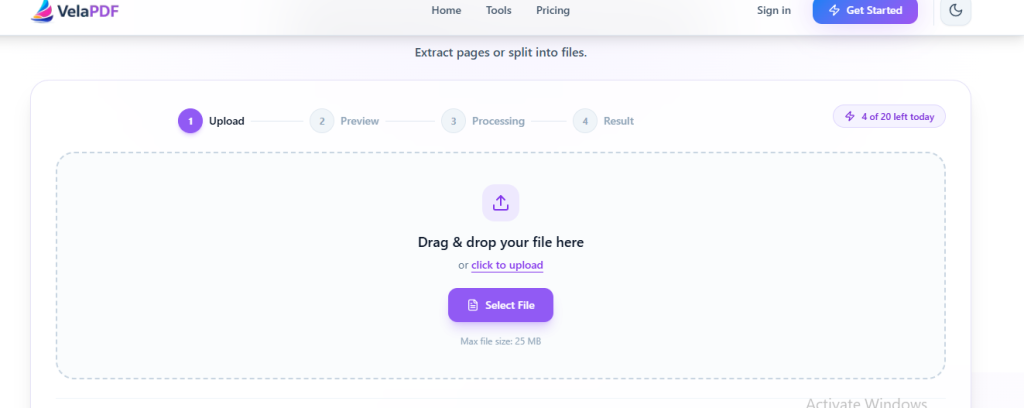
With a VelaPDF Split PDF Tool, you can split PDF online and divide a PDF into separate files, extract pages from PDF files and pull out the pages that matter, and pass along only the information another person needs. This is useful when the PDF is too big, if you only need a few pages, or if you want to improve the organisation of your document.
Rather than forwarding a document in its entirety, a web-based PDF splitter gives you a straightforward way to improve PDF management and arrange your files without adding new software to your computer.
Why People Split PDF Files
A lengthy PDF is often more trouble than it is worth. In many cases, only a handful of pages are useful when you need only certain pages: perhaps part of a business report, a single unit from study notes, or a shorter version for document sharing.
This feature can be used to increase efficiency when only selected portions of the document are being sent to clients, colleagues or institutions. It also saves unnecessary file size by retaining only the important pages.
People commonly split PDF documents in order to:
· Share only selected pages instead of the whole file
· Keep records and documents in better order
· Produce smaller files when the PDF file is too large
· Split large PDF files into separate sections
· Preserve the material that is actually needed and organize PDF documents
Managing PDFs in this way makes everyday work less cumbersome. It cuts down on needless bulk, keeps documents easier to handle, and helps prevent important information from being buried among pages that serve no immediate purpose.
How a PDF Splitter Works
The reason of PDF splitter is clear, it will split PDF into smaller documents, and create a new PDF from the selected pages through page extraction. No need to edit the original file manually. You just select the pages needed to extract selected pages from PDF and save a new document with just those pages.
Using VelaPDF, this is accomplished in the browser window, making it easy to extract PDF pages with minimal effort from the user.
Benefits of Splitting PDFs Online
The online PDF splitter can be used for a variety of practical purposes.
Simpler Sharing: A reduced file is easier to send via email or messaging services, especially if the PDF file is too large to conveniently transfer.
Tidier Records: Removing unnecessary pages simplifies the process of document organization and storing records later.
Less Wasted Time: Instead of creating new documents from scratch, you can separate pages from PDF files you need in just a few moments.
Original Appearance Maintained: The process splits the document without changing its formatting, so the text, images and layout are as clear as they were before.
Steps to Split PDF Online
If you want to divide a PDF into smaller parts, the procedure is uncomplicated.
1. Upload the document by dragging it into the tool or choosing it from your device. The file must not exceed the 20 MB size limit.
2. Decide which pages should appear using page range selection. This allows you to isolate only the material that is worth keeping.
3. Choose the method that best suits your purpose. You may:
· Split PDF by page range
· Extract PDF pages
· perform page separation
· split PDF into multiple files
When the task is finished, save the newly created files to your device without delay.
Features That Make PDF Splitting Convenient
A reliable PDF splitter ought to do its work without unnecessary complication. The most useful features are often the simplest:
· Fast processing for documents of different sizes
· Careful handling of uploaded files for better workflow optimization
· Clean output without added watermarks
· Support for computers, tablets, and mobile phones
· Free use without the need to create an account
Taken together, these qualities make the VelaPDF Split PDF Tool suitable both for someone who uses it once in a while and for those who deal with PDF documents as part of their daily work.
Common Situations Where PDF Splitting Helps
Many times it is beneficial to split a PDF into smaller sections.
At Work: A report or presentation might have more to offer than another person needs. Only sending the relevant pages helps document sharing and ensures that the communication remains focused.
Study: Students can split longer reading materials into individual lessons, chapters, or notes and separate chapters from PDF and organize them in a manner that best meets their needs.
Personal Records: When papers are scanned individually, they are easier to store and organize PDF documents. Legal Papers: Agreements and contracts can be divided into distinct components, making them easier to read and manage.
For Freelance Projects: Independent professionals can organize client documents through file segmentation into smaller files and prevent unnecessary clutter.
Is It Safe to Split PDF Files Online?
In most cases, yes. A reliable service does not just take care of the security of files as an afterthought. Normal operation means that uploaded documents are not opened and reviewed by people, but handled in an automatic way.
Once the task has been completed, the files are removed from the server after about ten minutes. This way users can interact with their documents in a simple manner and minimize the risk of storing unnecessary copies online.
Conclusion
Tools such as VelaPDF allow users to split PDF online without software installation, enabling them to easily divide PDF files into smaller documents, enhance PDF management, and streamline document sharing for work, study, or personal records.
An online PDF splitter is a simple tool that allows you to split PDF files into multiple files, extract pages and improve PDF management. You can easily split chapters, select pages to share and split PDF into smaller documents without installing software. VelaPDF PDF Tools will enable users to manage documents more efficiently and to perform PDF tasks easily.
